01
Select images
Choose a single file or multiple JPG, PNG, or WebP images (up to 20 MB) directly from your Android device.

Convert raster images (JPG, PNG, and WebP) into scalable SVG and EPS formats directly on Android. Includes optional 2x upscaling, batch processing, and offline local operation.
A direct process for converting raster files from your device gallery into usable vector formats.
01
Choose a single file or multiple JPG, PNG, or WebP images (up to 20 MB) directly from your Android device.
02
Use Automatic mode for balanced defaults, switch to Manual for finer adjustments, or enable 2x upscaling for soft sources.
03
Conversion runs directly on your device without uploading files to external servers or requiring an internet connection.
04
Review edge clarity at up to 433% zoom, then save the output as SVG, EPS, or a bundled ZIP archive.
Select images from your device, choose automatic or manual settings, inspect edge clarity, and export vector files without relying on desktop software or external upload services.
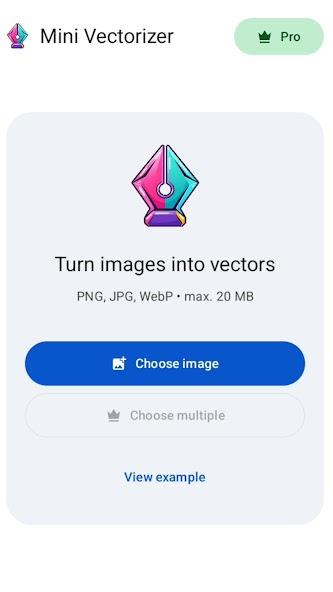
Select steps 01–03 to inspect each screen of the application
Switch between Original and Vector, then zoom up to 433% to observe edge clarity at higher magnification.
With 2x upscaling enabled, softer source images are refined prior to tracing to maintain cleaner curves and contours.
Available export formats
Widely supported across web browsers and design tools such as Figma, Adobe Illustrator, CorelDRAW, and Canva.
Focused tools for clean bitmap-to-vector conversion without unnecessary complexity.
Convert raster images into standard vector formats suitable for graphic editors, web assets, printing, and microstock submissions.
Select multiple images at once and process them automatically in sequence to reduce repetitive work.
Enhance low-resolution or slightly blurred images prior to conversion to produce cleaner contours and smoother curves.
Package multiple converted vector files into a single ZIP archive for orderly storage and transfer.
All conversion tasks run locally on your Android device, allowing consistent use without an active internet connection.
Images remain on your device throughout the process. No personal data is collected or shared with third parties.
Available on Google Play for individual image conversion, with an optional Pro upgrade for batch workflows.
Intended for converting individual logos, icons, and illustrations directly on Android.
Designed for recurring workflows that require multi-file conversion and bundled ZIP exports.
Key information regarding supported formats, offline processing, and data privacy.
Install Mini Vectorizer to convert JPG, PNG, and WebP images into SVG and EPS files offline on your device.